Showing posts with label bear. Show all posts

Tuesday, December 4, 2012

LINE

LINE App for iPhone
     This is my favourite chat program designed for smart phones.  However, once you sign up, you can even use LINE from your computer!
     This chat program has a lot of features.  Remember the LINE Camera application I reviewed a few months back?  Well, this is by the same people.  And you can import edited photos from your LINE Camera directly into your LINE chat!
     You will be given an ID number when you sign up.  You can choose to change this by signing up for an account, verifying your email and phone number and setting up your own ID, rather than the randomly generated one they gave you.  I suggest doing this (Especially the email verification) especially if you intend to purchase stickers.  If you do not, if you delete the application or switch devices, you'll lose all of whatever was linked to your previous account.  Stickers, friend list, etc.
     Let's go over some of the features this has, other than just chatting one on one with your friends.
     You can chat one on one or in groups.  Invite all of your club members to a chat room to discuss a topic. Invite all but one of your friends to a room to discuss the surprise Birthday party you're planning for them.
     When in a room (A chat room or a one on one room) you'll see some options on the screen.  The top left has a back arrow to return to your friend list or chat list.  The top right allows you to add a friend, turn off notifications for that specific chat window, block the person you're talking to or go into the settings for this chat window.
     In the settings menu you can export the chat history to save for later reading.  Delete the chat record... Or change the chat wallpaper.  You can either use your own photo or a wallpaper from the list as your background for the chat room.  Remember, only you'll see this wallpaper.  The other person or people involved in the chat will see the wallpaper they have chosen.There are currently 36 wallpapers available that come with the application for free.  You'll see some of them in my screen shots.  I like to have a different wallpaper for each room I'm in.
     Back in the chat window, on the bottom there's the bar you type your message in. Tap it and it will bring up the keyboard.  Type your message and hit send.  There is a limit to how many characters you can write, but it's a big limit.
     Want to make your message ore personal?  Tap the icon by the chat window that looks like a face.  This will bring up the stickers, emotes and emoji screen.  There are many free sticker sets you can download.  You can also choose to purchase more with real money (Usually about 2USD each set).  The emoji are little icons that will be placed in your text message.  Things such as hearts, lightning, music notes, crowns, televisions and so on.  The emoticons are little ASCII faces that you can place into your message.  See the screen shot on the left?  My message uses an emoticon and an emoji.
     The last option on the chat window screen is the plus sign on the bottom left.  Click this to bring up the screen to show what you can add into the chat.  A photo, a video, a voice message.  You can even show your contact information or current location.  I recommend only using those options with people you know and trust.
     Outside the chat room now, when you are viewing your chat list or friend list you can again, see some options around the screen.
     Top left is "Edit" This allows you to remove friends or chat rooms.  Top right of the friend page is an add friend option.  Top right on the chat screen is the new chat room option.
     The bottom of the screen shows the friend list, chat list, the timeline and "more".
     The timeline is a fun feature that allows you to see what new things have been posted by people on your friend list.  Whenever someone posts an update on their life, it will post it here for you to see, comment on or even leave a sticker on.  Click their icon and view their home page.  This will show you that friend's posts.  You can also visit their page by clicking their icon in a chat room or on your friend list.
     The image to the left shows what a home page looks like.  It's my home page.  It shows the name and user icon on a graphic of their choosing as your top banner.  Click this on your home page to change the image.  Below this are all of the posts you've made.  A post can be text only, text and a sticker, text and a photo, just a photo, just a sticker, you can add a video or even a location.  However, you can not add a sticker and a photo.  or a photo and a video.  Multiple photos... anything like that.
     Tapping the pencil icon in the top right corner of the timeline page allows you to post to your home page.  This post will show up on the timeline of anyone you're friends with.
     The top left corner shows your timeline notifications.  If someone leaves you a sticker or a comment, it will be posted here so you'll know.
     On to the "More" option at the bottom of our screen.  The screen to the right is what this looks like.
     At the top.  Add friend, Settings and Home.  Home takes you to your home screen I mentioned earlier.  The add friend is self explanatory.  Settings takes you to a page with lots of settings you can browse and adjust.  I will list these options here.
     Profile: Display name - What's Up - UserID - Public UserID on/off.
     Accounts: Change Your Email - Phone Number  Facebook - Authorized Apps - Devices.
     Stickers: My Stickers  Purchase History  Gift Box - Sticker Options.
     Notifications on/off: Mute - Tone - New messages on/off - Show preview on/off - Additional services.
     Chats & Voice Calls: Chat Wallpaper - Font Size - Send with Return Key o/off  Screen options.
     Friends: Contacts  Hidden users - Blocked Users.
     Privacy: Passcode Lock - Public UserID - Generate new QR Code  Clear Chat History - Timeline & Home Privacy.
     Help / Tell a Friend / About LINE
     Back onto the "More" screen.  From here you can access the Sticker Shop.  You can view all of the available sticker sets.  Some are free, some are paid and some you can get as a promotion for downloading other LINE applications.  You can even give sticker sets as gifts to your friends!
     I'll let you know which sticker sets I have.  I have all of the free sets as well as the LINE POP (Promotion) set, The Bizzle (Promotion) set, Rilakkuma, Cony's Happy Work Life, Office Lady Nobuko and Smile Brush.  Ones I would like to purchase in the future (Or you could gift them to me! *Flutters lashes* PetiteKitty is my ID) are My Sweet Day, Monchie Girl Mogumi and Becky's Stickers.
     Also from the "More" page you can find Official Accounts.  These accounts displayed depend on the country from where you are accessing.  For the United States, the Official LINE accounts are T-Pain, Kreayshawn and Snoop Dogg.  Apparently rap artists like LINE!  There are more in Korea of course, where LINE is more popular.
     You also have notices on the "More" page which are updates posted by NAVER (App creators).  Keep an eye on these because sometimes they'll post about limited time offers like free promotional stickers!
     Below these on the More screen are the additional LINE apps you have.  LINE Brush, LINE Camera, LINE POP, LINE Card ans so on will be posted here.  Clicking them will open those applications for you, directly from this app.  How convenient!
     I really enjoy this application, and I think you will too.  If you want more information you can check out the Official website.  It's free, adorable and a lot of fun.  You can even make calls from the application, so if you install it on an iPod touch, you can use it like an iPhone! (Provided those you wish to call also have LINE).
Rating: 5/5
  • Free
  • Category: Social Networking
  • Updated: Nov 30, 2012
  • Version: 3.3.0
  • Size: 28.0 MB
  • Languages: English, Chinese, Indonesian, Japanese, Korean, Malay, Thai, Turkish, Vietnamese
  • Seller: NAVER JAPAN

Tuesday, October 30, 2012

Bearable

Bearable App for iPhone
     It's almost Halloween!  We all know you can't have Halloween without candy or bears, right?... What?  You can have Halloween without bears?  I don't believe you!
     There are 4 game play modes, as you can see in the picture to the right.  Story mode, Speed play, Timed mode and 2 player mode.
     Story Mode: You play a little panda bear that lives in an enchanted forest.  One day he realizes that something sinister has happened!  All of his friends have been transformed into delicious food!  Who would do such a thing!?  Help him find out by journeying on toward the answer.
     You will move along a path.  Each large icon represents a cut scene.  The small dots are progress toward the next scene.  You must play and win the puzzle stages 3 times to go from one cut scene to the next.
     The scenes have audio dialog as well as text to read along under the images.  It's a very cheesy story, as is the voice acting.  but somehow it just adds to the joy of the game.  It's the strangest thing.  You think yourself a fool for continuing through the story when it makes no sense.  At the same time you can't stop yourself from wondering what could possibly happen next.
     Below are some screens of cut scenes.  The art isn't spectacular but it gets the job done.  It's very colourful and eye catching.
     For some reason, my favourite part is that the bear finds a Pringles can (As you can see in the image above, to the left).  The Pringles can has a silly voice and calls the bear "Son" at the end of every level you beat.
     During the puzzle mode you will see many colourful shapes and panda heads on the screen.  Switch two to make a row or column of at least 3 of the same colour.  They have to be in a line.  Simple touching wont do.  Also, diagonal does not count.
     During the levels you can click the small button on the bottom left.  This is the "Hint" function.  It will let you know where you can switch some pieces to make matches.  This can come in handy when there's only one or two matches available on the board.
     If you do run out of matches the screen will reshuffle.  Also, just before the level end you might get a special event where all of the touching colours on the screen explode for one final extra point blast.  But you can't play any more after this happens.  If it's not enough points to beat the level, you'll lose and have to start that level over again
     Each level has a goal for how many points you need to earn to beat the level.  Sometimes you can acquire this quickly.  other times you can't.  It's all in the luck of the draw.
     To get a better score you want to get combos.  Find matches very quickly.  You'll know you're doing well based on the sounds the app makes after each match.  If they get higher and higher you're starting your combo.  If it goes back to the regular sound, you've taken too long.  You'll know you have a max combo when it goes from a high itched noise to a more 'exciting' sound.
     Winning levels will gain you points that you can spend on bonuses you can use at the beginning of a level.  You can see them on the screen to the right.  Buy them before playing the next level to get through more easily.  However, don't waste them.  You'll want to save up until the end of the story mode, when it gets harder.  You will also get 10000 bonus points after completing story mode.
     Speed Play:   This mode has a timer at the top.  Once the timer runs down, it's game over.  It keeps track of your best score.  This mode is for when you only have a small amount of time to waste.
     Time Play:  This mode will have a timer that slowly runs down at the top.  Gain as many points as you can before it runs out.  When you beat a stage it will replenish some of the time, based on how well you did (Combos get you extra seconds). This will continue to happen until you run out of time.  It will keep track of your best score.  Try to beat it!
     2P Mode: is for when you want to play with friends.  Se the phone between you on a solid surface.  One puzzle will be on each side.  One upside down, one right side up.  Each of you can make as many sets as possible.  A meter on the side will let you know who is winning.  You do not have access to hints during this game mode.
     I thought this was a fun and quirky little game.  Appropriate for all ages.  If you're no good at puzzles, I wouldn't worry too much.  The point goals in story mode tend to be low.  I think anyone could easily play this game.  Plus you can beat it in under an hour.
     This game will game you going around saying silly things like "The secret ingredient is real bear juice!" and other such nonsense.  it's just too silly not to give a try.
Rating: 4/5
  • Free
  • Category: Games
  • Updated: Sep 12, 2012
  • Version: 1.1
  • Size: 12.4 MB
  • Language: English
  • Seller: Mooff Games Ltd

Monday, September 24, 2012

Pocket Bear Kuma San

Pocket Bear Kuma San App for iPhone
     I will start by explaining why I downloaded this.  I loved Tiny Tower, I love teddy bears, I photo photo editing applications... It seemed like an adorable mix of all those things.  And yet somehow... I do not like this application very much at all.
     I have been trying to figure out where this app went wrong.  I was sure that I would enjoy it considering it had so many elements that I am generally attracted to, in an application.  So let's go over the various elements and see if we can figure it out.
     When you start the app up you get a cute little story as to why Kuma is living in this building.  It seems like a nice idea.  However, this story plays every time you start the application up.  If you switch apps for a moment and switch back, you will have to skip passed this story again, rather than just viewing the screen you left the application on.
     Kuma lives in a one story building and you must add floors with the coins you collect through playing the game.  Your goal is to make the building very big so that it is worth a lot of money.  Why?... I... I don't know.  Apparently Kuma is elitist.
     There are many tasks you will need to complete for Kuma.  They are generally very easy, but the payout for them is incredibly small.  You will do them mainly for experience.  As this will cause Kuma to gain levels. So we now have 2 goals... Build a tall home worth a lot of money, and level the bear up by completing tasks.
     You can also earn experience by arranging the furniture, buying items, feeding Kuma and so on.  That bring me to another point...
     Kuma does not need to eat.  Eating does not give him energy... He will not die if you do not feed him.  You need to purchase the food and it has no benefit in any way.  The only time you will get anything from it seems to be when your task says to feed him.  Then feeding him will complete a task.
     Kuma will make comments while he is wandering around his house.  I feel like the phrases written for Kuma were written either by or for someone around the age of 10-12.  He discusses passing gas, television shows, and so on.  I find it to be more annoying than fun.  He also wanders about, passing gas and laughing about it.  Why does he do this?... I have no clue.  I really wish there were some sort of "personality toggle" where you could give him a personality that is more fitting for what you would enjoy.
     The application isn't very old so there is not really a large selection of items to use for decorating the home or dressing your Kuma.  But much of what is available seems nice.  Some of the more expensive items are interactive.  Kuma can 'use them'.  however, it doesn't tell you which are which.  You cant find out until after you have purchased the item.  And some items are really... not as interactive as you might want them to be.  When you click an item and it has a "Use it" bubble you can click it and Kuma will go perform an interaction with that item.  For the bed, he takes a nap... For the loo, he sits and reads a paper.  For the bath he washes up.  However, the bookshelves sometimes say "Use it"... He just stands in front of it.  He doesn't face it.  He doesn't read a boo... Apparently Kuma is confused as to how to use a bookshelf.  Why even bother putting the interaction feature there if you have no interaction assigned to it?
     The mall... Clicking the mall button takes you to the additional parts of the game.  You can purchase clothing or furniture here.  You can purchase treats as well.  However, I think they went over board.  They added too many extra features to the mall.  There's a place where you can read "inspirational messages" a place to see your horoscope, a place to play 2 mini games, a place to buy coins, a place to edit photos, a place to invite friends, a place with jokes and riddles, a magic 8 ball, facts & trivia, achievements page, news, settings and so on...  This application is completely overloaded with useless junk.  Yes, some of those things are nice, but does it really need all that?  No.  Pick something you want to do with the app you create and stick to it!  It's a ruddy cluster of useless tid bits.  I suggest getting rid of the entire "Kuma Chat" section, Kumas Korner (You can get this information from the main page already), Photobooth (Make is a separate application), The Treats place (Take out the eating feature all together, there is no point to it), along with several other things.
     Alright, let's discuss the Photo booth now...  There is a section where you can load up or take a photo and add frames and stickers to it.  You can also screen capture Kuma in his home and decorate that instead.
      The options for this are very limited, but I believe that is because they set this up as an extra feature rather than just making the photo section it's own app.  Why not have a whole collection of Kuma applications, rather than forcing everything into one.  The frames are cute, as are the stickers.  there just aren't many to choose from.  Many have to be purchased with the coins earned from playing the game.  To the left you can see a sample photo done in the application.
     There are also 2 mini games for this application in the arcade part of the mall.  Playing these games will earn you coins if you do well.  There is also a high score section.  The games aren't bad, but I feel like they may be better off as their own application as well.  Though I admit it is a fast way to earn extra coins.
     The first game is Protect Kuma San.  This takes place in a forest.  There are items that pop up here and there and several spiders.  Kuma wanders about the screen and the spiders approach him quickly.  You can click the items such as coins and treats to earn extra points/coins.  However, they are small and often I have clicked directly on them several times and the game does not recognized that I have.  The spiders move quickly and often Kuma is at the edge of the screen (Since you can't control his movement), so he gets attacked quickly.  Once his life bar is empty, it's game over.  It's a fun game, but I think it could use a little tweaking.
     The second game is Kuma's Clutter.  it shows a messy room and gives you a list of things to find within the room.  This can be difficult on iPhone because of the screen size and how small some of the items are.  I don't know about most people, but with my limited eye sight, I find this game to be more frustrating than fun. I can barely make out what half of the items are.  You are timed and get coins depending on how many items you find and how quickly you found them.  if you are having trouble the hint button will show you where one of the items is.  However, it will deduct points from your total score.
     In closing I believe the main problem with this game is that there is too much going on.  they went overboard with the additional features' that it almost makes the game more of a hassle than a joy.  The Kuma character is visually cute and I enjoy dressing him up.  However, his attitude/personality I personally find to be unattractive.  I don't see a real goal in the game.  There are so many different things you're supposed to be doing, it makes you confused on what it is they really want you to do. Score high in the mini games, complete the tasks, get your achievements, level your bear, make your house worth more, build floors, furnish the floors, feed the bear, and so on...  I think the application had the potential to be really great, but somewhere along the way the original concept and idea got lost and buried until unnecessary fluff.
     Sorry, Kuma... You're not getting a high score from me.  Maybe if the app creators rethink this application and make some changes, I'll redownload it... But for now... I'm deleting it off of my iPhone.
Rating: 2/5
  • Free
  • Category: Games
  • Updated: 13 September 2012
  • Version: 1.1.2
  • Size: 20.5 MB
  • Language: English
  • Developer: W3 Innovations, LLC

Saturday, August 25, 2012

Block Bear Free

Block Bear Free App for iPhone
     First off I want to say that the icon is from the full version, but I am reviewing the free version.  Please don't get confused by the icon!  (I also apologize in advance for the choice of screens I captured.  Not the best examples of the game)
     This is a puzzle type game.  Basically a "make you think" application.  Right up there with "Draw the Line", "Where's the Water" and "Cut the Rope".
     What the basic idea is, is that you have one or more small bear blocks (Bears in the shape of a block... those poor tortured souls).  These blocks have no ability to move on their own.  And somehow they have found themselves in a very dangerous place.  Be it on the top of a poorly stacked tower of boxes and balls, or teetering on a well balanced rod.  Your job is to get them to safety.  Where would that be?  Well on the ground of course (Though sometimes it's a pedestal or a honey pot.  You'll know if there's a particular place your bear is meant to be).
     In order to do this you can remove one item at a time by tapping on it.  Tap on a box, it disappears.  This absence will create the stack to shift (If it's part of a stack).  The bear will also shift with the stack.  Tap another piece and it too will be removed from the puzzle.  Eventually the bear will reach the ground where it is no longer in danger of falling to it's untimely death.
     Now, this sounds simple enough, right?  No challenge with that, right? Well, no... As you go along through the levels, the puzzles get more and more complex.  If your bear falls into a pit, it's game over (Epic Fail).  If you time the pieces you remove wrong.  Or even the order of them, you could lose the level.  Also, if you have multiple bears and they don't all make it to safety, it's game over.
     Once your bear is safe on the ground it will check (Say "Checking") and end the game if the bear doesn't suddenly slide into a hole (Which has happened before).  If all if well, you win the level (Epic Win)!
     There is no scoring system.  No stars.  No "Tweet my awesome score" feature.  You just go straight from one level to the next.  You can replay a level or go back and do previous levels.  Sadly there is an absence of a tutorial or how to, however.  Which can be problematic, if you've never played this sort of game before.
     There are 10 levels in the free version of this game application.  If you enjoy the game, and choose to upgrade to the paid version, you'll get over 200 levels to play.  The paid version also has 5 game modes, each with a different story line.  The free version has one mode only.
     The free version is like a sample taste.  You get a basic feel for the game.  If the free levels are too complex or frustrating for you, you know not to buy the full version.  If you find yourself being particularly good at physics based games, then you may choose to pay for the full version of the application.  The full version being only 99 cents, which seems very reasonable.
     I really enjoyed it.  I wont be buying the full version.  Not because I found the puzzles hard or think it costs too much.  I wont be getting it because this simply isn't the sort of game I find myself wanting to play when I'm bored.  I do think it's a well made, cute and fun game though.  And if you enjoy this game style, I think you should give it a try!
Rating: 4/5
  • Free
  • Category: Games
  • Released: May 18, 2012
  • Version: 1.0
  • Size: 9.9 MB
  • Language: English
  • Seller: Alejandro Garcia

Tuesday, July 31, 2012

Escape Bear


Escape Bear App for iPhone
     So let's say you're a bear... You're in some sort of prison... This is the craziest booby trapped prison in the world.  You try to escape, but the prison guard chases you... and if he catches you, he will gruesomely beat you to death... Then you must be living in this game...  And your life is terrible, you have my pity.
     This is the basic concept of the Escape Bear application.  We don't know why the bear is in jail.  Nor do we know why teddy bear prison is so treacherous.  What we do know is that we must escape!
     You can do achievements and even earn coins to use in the shoppe.  You can purchase useful items and extra characters in the shoppe.  You can also use real money to purchase things here.
     There are sound and music mute options in case the noises start to bother you.
     There are several levels to run through.  Each level is just a long corridor.  You can not control your bear moving forward.  You can not turn back, slow down, go faster or stop.  Your bear automatically runs forward.  There are traps and obstacles scattered through out the corridor that you must avoid.  Certain obstacles will slow you down, others mean instant death.
     If you slow down more than once the dangerous bear running after you will catch up to you.  When he catches you he will pummel you to death with a spiked club.
     Each level becomes more and more of a challenge.  The first several levels are simple.  They gradually add newer obstacles and traps to the corridors, and they get longer and longer.  You will also get a score at the end of each level.  However, to unlock the next level you just need to complete the level before it.  Even if you don't do very well.
     The graphics aren't great, and the character design is a bit lacking.  The game is simple and after playing a few levels it begins to become boring from the repetition.  However, it's an alright game.  I'd suggest it in smaller doses.  There are survival and "hell speed" modes for more of a challenge, but I wasn't really that into them.  I suppose that's more for 'hard core' fans.
     I love teddy bears, and 'dark stories' paired with teddy bears always seems interesting to me.  However, this game didn't do much for me.  Maybe it was the graphics, maybe it was the lack of an actual story...  Or it could have just been that there wasn't enough to the game.  It's really just "Move left, move right, jump, move left, jump, move right, jump" over and over...
     Don't get me wrong, it's entertaining for a little while.  It's just not my sort of application.  I think this game requires a particular kind of gamer that enjoys this genre of games.  It's challenging for sure.  Especially in the higher levels.  I think it could be worth a shot.  You never know, you might like it (Especially if you're into "dark" games).  It 'is' free after all.  What do you have to lose?
Rating: 3/5
  • Free
  • Category: Games
  • Updated: Jul 16, 2012
  • Version: 1.2
  • Size: 24.1 MB
  • Language: English
  • Seller: Humble Gaming Limited
Rated 9+ for the following:
  • Infrequent/Mild Cartoon or Fantasy Violence
  • Infrequent/Mild Horror/Fear Themes

Saturday, May 19, 2012

Rilakkuma Alarm

Rilakkuma Alarm App for iPhone
     This is one of the first applications I paid for when I got my iPhone 4 last year.  When I got it, it worked great.  I used it every morning to wake up.  However, when it came time to update my OS to 5.0, this application became useless.
     If you have OS5.0 or up, do not download this application.  I have contacted their support team repeatedly.  I have never gotten a response, and they have never fixed the issue.  The problem here is that the alarm can not force the phone out of sleep/lock mode.  Which is what you would need it to do.  Unless you want your phone to be eating up batteries in active mode all night just to use this alarm.  If your phone is locked (Sleep mode) the alarm will not go off until you slide the lock bar and turn the phone back to active mode.
     Now, I do not know if this still works correctly for Android users.  So if you use Android, you'll have to find out if this is glitched for you guys or not.  My reviews are just for the Apple versions of these applications.
     It's only fair to give you some info on how this worked before it got glitched from the OS update.  So here we go...
     Once it loads up you see an animated little Rilakkuma and Korilakkuma sitting on a clock.  They sort of bob up and down.  You can then set an alarm.  You choose the time the alarm goes off, whether you want snooze on or not and how often that alarm should go off (Daily, only'y on Tuesdays, etc).  So it basically works the same as the pre-installed alarm application.  The difference being that it's far cuter.
     You can edit, remove or add new alarms.  I believe 5 alarms is the limit.
     You can use the default alarm sound or choose an MP3 from your device to use as the alarm.  That is what you will hear, when it's time to wake up.
     When you turn an alarm on, the tiny teddy bears go to sleep in their basket above the clock.  Just before it's time for the alarm to go off, they shift around a bit.  Then at wake up time, Korilakkuma jumps on Rilakkuma's back to wake him up, as the default beep or MP3 you've chosen goes off in the background.
     When this worked, I loved it.  As I said, I used it constantly.  However, as it no longer works correctly with the new OS, and they refuse to update it... I have no choice but to give this a rather low rating.
     You 'can' use this for short term alarms.  Say a 5 minute timer or what not.  As long as it's short enough that your phone wont turn to sleep mode before it's time for said alarm to go off.  Otherwise, I wouldn't waste your money.  Maybe if it were a free application.
     To be honest I think any application that hasn't been updated in a over a year should become free.  It's obviously been abandon.  Sadly this company has a habit of doing that with these applications.  So always read the reviews before purchasing!
Rating: 2.5/5
  • $1.99
  • Category: Entertainment
  • Size: 11.9 MB
  • Languages: English, Japanese
  • Seller: Imagineer Co.,Ltd.

Wednesday, May 16, 2012

Rilakkuma Shopping List

Rilakkuma Shopping List App for iPhone
     You may have noticed I only have one screen capture for this application.  That would be because it doesn't work/load.  I'm not sure how well the Android version works.  I have to say, the application can be as adorable as possible, but without the ability to function... It's going to lose some points in my book.  Especially when you have paid for it.
     The first day I downloaded this app, I'll admit that it worked great!  It allowed me to choose different backgrounds for my list.  Create multiple lists.  Add items and cute Rilakkuma icons next to the various items on the list.  I was going to give this a really nice review.
     Day two, I click the icon, the app screen comes up, then it disappears... it wont load.  I try it every day, every day it wont load.  I updated the OS... still wont load.  Apparently this has been an ongoing problem with this app.  People have been trying to contact the support about it, bu no one gets any response, and the app doesn't get updated.  I have had a similar problem with this company in the past.  They don't seem to read the reports... or they just don't care.  For a professional organization, I find this to be very problematic.  We are paying for these applications.  You could at least update them.  Why they don't reply to support inquiries is beyond me.
     I am sorry, Rilakkuma!  but I have to give this application a low score.  Don't download it, you'll be wasting your money.  I'll make an update if the app ever gets updated and fixed.
Rating: 1/5
  • $1.99
  • Category: Lifestyle
  • Updated: Feb 28, 2012
  • Languages: English, French, Japanese
  • Seller: Imagineer Co.,Ltd.

Thursday, May 10, 2012

Rilakkuma Flags

Rilakkuma Flags App for iPhone
     This is a rather simple game applications.  Rilakkuma and Korilakkuma will show you a flag colour and a direction (Up or down).  Your job?  Lift or drop your flag of that colour at the same time (Or very quickly).
     As much as I adore Rilakkuma and little Korilakkuma, I have to say that I am really disappointed with this game.  it's a bit 'too' simple.  To the point of being very dull.  Lift the red flag... Lift the white flag... Lift the red flag... Drop the white flag... Over and over until you mess up  four times  I'm all for simple... This goes beyond simple.
     At first i thought that perhaps this game was just targeted at a far younger audience, and as an adult I simply wasn't able to enjoy it.  But I am willing to bet even a child would not be entertained by this for more than two minutes at most.  Adorable teddy bears can only do so much for a game.  If it isn't fun... it isn't fun.
     Now this might be somewhat redeemable if it were a free application.  however... that is simply not the case.  you have to pay for this.  I feel bad for giving such a negative review to a Rilakkuma game, but it has to be done.  I would suggest not downloading this unless you are able to somehow get it for free (Perhaps it will go on sale in the future).  It just isn't worth the money.
     It tried to add a little bit of a challenge with 3 game levels.  Easy, medium and difficult.  But I don't think a challenge is what this game needs.  It needs a bit of depth and entertainment.
     In closing... Not worth the money.  Barely worth the download, even if you get it for free.  it's cute... I'll give it that.  But otherwise... I'm not happy with this purchase.  Sorry, Rilakkuma!
Rating: 1.5/5
  • $1.99
  • Category: Games
  • Size: 11.0 MB
  • Languages: English, Japanese
  • Developer: Imagineer Co.,Ltd.

Sunday, April 29, 2012

Bumping Bears (On Donuts)

Bumping Bears App for iPhone
     Though this is a paid app, it is currently available to download for free (For a limited time).
     In the mysterious 'donut universe', which is looked over by the bear god and goddess Bues and Bera (Zues and Hera), there is a problem with over population.  This is where you come in.  They ask that you take over a doughnut for them, and upon it, raise some of their tiny bears.  You get to choose one of the bears and raise it in your own way.  If you are unhappy with it's appearance, fret not.  You can change the way your bear looks.  Everything from eyes, snout and belly, to colour, clothing and theme.  You can even have a zombie or robot bear!
     You start with one bear, but as you progress as a guardian you accumulate a second, and eventually a third bear.
     Your bear can work for extra gold.  There are 3 tasks available.  Sushi picking, Robot saving and Street Patrol.  They are each very simple mini games.  The better you do, the more gold the bear earns.  There is even a ranking board so that you can compete against your friends for the best score.
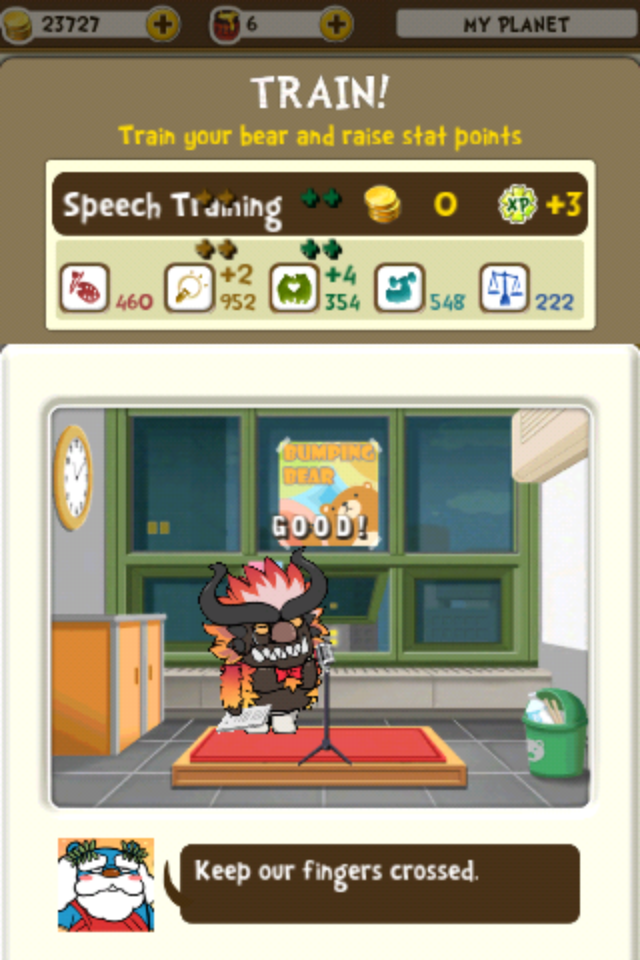
     You can also train your bear.  This is a very important part of raising your bear.  Depending on what you choose to train your bear in will determine what sort of occupation your bear qualifies for.  There are 5 different areas you can train in.  Artistry, Cleverness, Sociability, Stamina and Morality.  The higher your bear's energy level during training, the more points they will acquire.
     There are 2 training options available.  Quick training and Hard training.  I recommend "Hard".  Quick training gives you the base points you'd earn, and goes through the animation process itself.  The hard training gives you the base points however, during the animation, it releases gold coins, honey pots, gifts and extra stats that you can click on to earn as an added bonus.
     Not sure what jobs are available for your little bear?  When viewing your bear, 3 bubbles appear above it's head.  The first is the gender icon.  The second is it's current occupation and the last one is it's happiness level (Based on it's energy).  Clicking on the occupation bubble will take you to your occupation card collecting screen.  Click any card to see what the job is, and what the requirements are for that job.  Then work your way toward that goal!  You'll start out with a level 1.  You can move up from there, but you can never get a job that's the same level or lower than your current job.  So choose your path wisely.  Each promotion also gives you a bonus item.  These items can only be obtained through job promotion.  Your job will give you money every day that you can use to train your bear, decorate your doughnut or buy things for your bear or bear buddies.
     You may notice that there are stats that are not trainable.  The closeness stat, for example.  This is increased in many ways.  You can increase it through regular training, by clicking the hearts that shoot out when you make your bear happy, and also by cleaning the dust clouds from your doughnut.  If you spin your doughnut, or flick your bear up into the sky, you may sometimes see tiny yellow dust rings floating about.  If you clean them all away (By shooting your bear through them) you will get some hearts.  Click them to increase the closeness of your bear.
     Another non-trainable stat is popularity.  This can be improved by winning contests and going on dates.  You can only have 100 popularity.  It will not increase once you've reached that limit.
     You also have personal stats between your friends and you.  your friendship stats.  When you give gifts to your bear friends, or go on play dates, you increase your friendship stats between you and your guardian friend.  They will then show up closer to the top of the list when you view your galaxy (Which is the list of all of your friend's doughnuts).
     Contests are a fun part of the game.  Not only do they give you a chance to improve your popularity stat, you can also win gold and prizes!  The top 3 contestants get awards.  And you have a new chance to compete, every 8 hours.  The awards you have a chance to get are decorations for your doughnut that can't be purchased from the shoppe.  Letter decorations, gold, honey pots and potions that can be used to change the way your bear looks.  You can even send a screen capture of your victory to your Facebook page.
     Want more to add to your Facebook?  You can also have photos sent to Facebook from your dates.  Your bear can date any bear that is of opposite gender and on your friend list (In your galaxy, basically).  Just click the date icon under your bear when you're zoomed in, or go directly to your friend's doughnut planet and ask the bear directly.
     It costs 200 gold to ask for a date and the cost of whatever flower you choose to give to your bear's companion.  You get to watch them go to "Lovelet" the Love planet.  They may play video games at the arcade, listen to music, sit on a bench, sit on a couch, sit on the grass and watch the clouds... There are many different things available for the tiny bears to choose from.  You also receive stats when you ask for a date (You do not receive stats when accepting a date).  You can earn stamina, cleverness... any of the basic trainable stats.  You'll also get popularity and closeness, plus a friendship boost.  When looking for a date, always pay attention to the stat boost you'll get to choose the best.  I never choose a date that gives less than 10 stat points.  20 is a good find.  If there aren't any good ones, exit the date center and re-enter.  You'll get a refreshed version.  The more friends you have, the better your chance of getting a good bear to date.
     Lastly I'll cover the shopping district.  There are 4 shops.  One (Decor) for decorating your doughnut.  You may purchase doughnuts, tiny decorations and letters.  One is for  Another (Wheel) is a chance shop.  You use gold or honey pots to get a chance to spin the wheel to make your bear into a Zombie, Robot, Panda or Red Panda.  You can also spend honey pots here to spin a wheel to receive special clothes and decor that you can only get through this chance shoppe. There is a shoppe (Dress) for clothing.  You can buy hats, glasses, ties, tops and handheld items for your bears with gold and honey pots.  Some items must be unlocked by achieving a particular level first.  Lastly there is a shoppe (Morph) for changing the features of your bear.  Eyes, brows, nose, snout, mouth, ears and colour. You can pay in gold and honey pots.
     Over all I think this is a pretty fun game.  I am happy to have had the chance to play for free.  I doubt I would have downloaded it otherwise.  I suggest getting it now, while it's still free.  I believe the regular price is 1/99.  It's not too bad at that price.  I can tell a lot of work went into the game.
     On the down side this game does have some glitches and bugs.  I am hoping those get fixed.  Sometimes you don't get your points or rewards, sometimes all of your energy drains out when you go to the galaxy screen and come back.  I think that if they fix these bugs, this will be an even better game and get a better rating from me.
Rating: 4/5
  • Free (Currently) (Usually 1.99)
  • Category: Games
  • Size: 103 MB
  • Language: English
  • Seller: LoadComplete Co., Ltd