Showing posts with label lifestyle. Show all posts

Saturday, March 16, 2019

AlarmMon (Alarm Clock)

AlarmMon (Alarm Clock)
     Having trouble jump starting your brain in the morning?  Do you have a tendency of just slapping the snooze button and ignoring the alarm all together?  This alarm application finds a way to deal with that issue.

     I really like the concept behind the application which is an alarm that requires you to complete a mini game in order to shut it off.  In doing this you prove that you are at least awake enough to perform a simple task.  By getting your conscious mind working a bit, it makes it easier for you to wake up.  The app has potential, but only if you use it correctly.

     The app allows you to create multiple alarms for multiple times of the day or days of the week.  In creating a new alarm you can choose the mini game, the time of day, the day or days of the week it goes off (For reoccurring alarms), whether you want sound or vibration (or both), assign an MP3, choose whether to allow Snooze or not, choose a colour and add a memo.

     The app has tons of mini games to choose from and you can try them out before assigning them to an alarm.  You will need to download the mini games as there are only 2 installed with the basic app.  However, many of the mini games are free.  The ones that cost money are mostly the ones for pop music groups/celebrities.  These special celebrity mini games can be obtained either through in app purchase or saving up your points.  Users get points for every time they complete a mini game after an alarm goes off.  However, there is of course a daily limit for this (I believe it is 6 points a day).  Visiting the Shop allows you to see the mini games that cost points or money.  It also has a charging button to get free points (Though I found this does not work.  I followed the steps but no points were given).


     Different mini games may offer different sounds for the alarm.  Of course users can also assign their own MP3 sounds.  I found the sound without MP3 is just the same sound one might hear when they get a message on their phone.  it repeats over and over every few seconds, but it may be pretty easy to miss.  One MP3 I noticed was quite noisy and I feared using this might startle someone awake which isn't really good for your heart.  However, for those who sleep through alarms easily, this might be more practical.  For light sleepers like myself, it may just induce a heart attack.

     Once you unlock your phone (If it is locked) after the alarm goes off, the mini game begins.  The games are quite cute and simple and could easily be used for children or adults.  They feature simple tasks such as kissing someone until it wakes them up, dodging punches and punching back (Boxing style, not a street brawl), finding characters hidden in an area, repeating a pattern, etc.


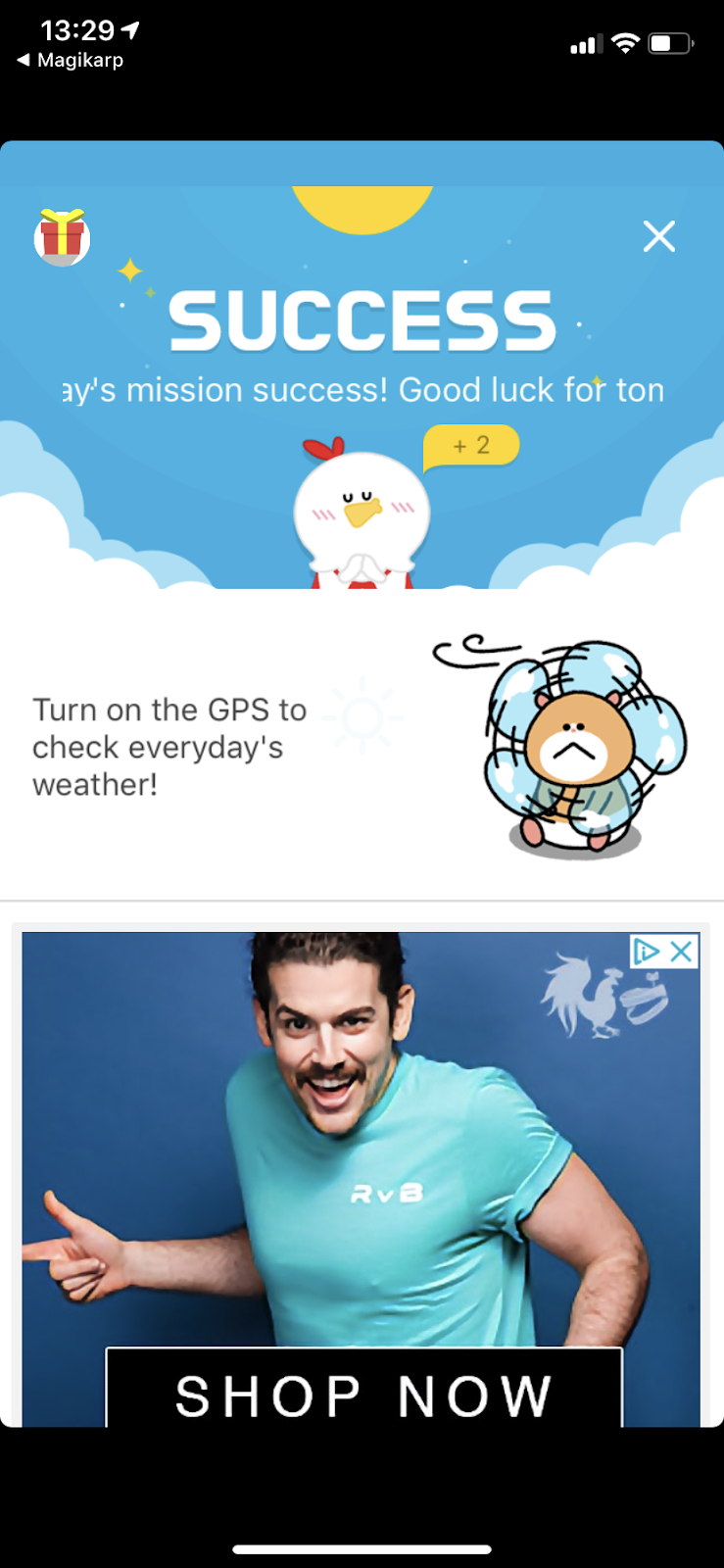
     When you complete the mini game and the alarm turns off (It continues until the mini game is completed), you are taken to a page that gives you your local weather, an ad (Unless you remove the ads) and some recent news feed stuff.  however, for me, the weather did not work.  I had it turned on in the settings and gave it access in my phone settings.  I troubleshot this a lot turning settings on and off, looking up information, closing, opening the app, uninstalling, reinstalling...  It just would not work.  This is disappointing to me and certainly affects the point value I give to this application as far as rating it goes.

     The app also has a Quick Alarm function that will choose a random mini game for you.  it is a great way to set up an alarm for a short nap (Say an hour).

     There are other options the application gives you for further customisation as well.  The last icon tab on the bottom of the app (Circle with 3 dots) will take you to a place to customise your profile, check your point history, read the FAQ, check to see if you have coupons and most importantly, it gives you access to Alarm Functions.

     In the alarm functions are users can toggle notifications, delete alarms and alarm history, sync alarms, choose whether or not to display the weather in Fahrenheit, display time in 24 or 12 hours, manually set time, gradually increase sound (Dangerous, it gets loud very quickly), turn off alarms without playing mini games (Thus making the entire purpose of the application pointless), turn on Low Power Mode (uses device settings for sound volume, vibrate, etc), toggle the Snore Checker (uses your microphone to see if you snore... eats up battery) redownload previous purchases (Associated with your account) or turn on sleep inducing music to help you sleep.

     Users can click the calendar icon on the main area of the app to see what alarms they have previously had.  It tells them how long it took them to complete as well as when it went off and what game they chose.


     The app does have ads but users can choose to pay to turn them off.  The annoying part about this is that the ad removal is temporary, even though you pay for it.  You can pay to remove ads for 30 days (0.99USD) or one year (8.99USD).  The ads are a banner toward the bottom of the app that is always there, a large square ad on the weather/news screen after an alarm, and an occasional pop up ad after an alarm is completed.  It honestly seems like a lot of ads for an alarm app.  I also feel that a one time ad removal payment would be a better option.

     One more issue is that if anything interferes with the alarm, it will not go off.  This means if a phone call, message, notification, etc happens at exactly when the alarm is meant to go off, the alarm does not go off.  Also opening the app at precisely the time the alarm is meant to go off can override the alarm.

     Due to the ads and lack of some functionality the app is supposed to have that simply does not work, I can't give this full marks.  It is a cute application though.  If users make sure to use the sound (not just vibrate), remove the snooze option and choose to sit up to play the mini game (This makes it easier to wake up.  Playing while continuing to lay comfortably can make you simply fall back asleep), I believe this app could be a very helpful tool for waking up in the morning.
Rating: 3/5
  • Free
  • Seller: Malang Studio Co. Ltd
  • Category: Lifestyle
  • Size: 68.1 MB
  • Languages: English, Arabic, German, Indonesian, Japanese, Korean, Portuguese, Russian, Simplified Chinese, Spanish, Thai, Traditional Chinese, Turkish
  • Copyright: © malang studio
Rated 4+

Saturday, August 25, 2018

Survey Mini

Survey Mini
     This app promises to reward its users with free money in the form of gift cards for the simple act of completing surveys. Does it work?... Well, sort of?
     Let's start with the basic parts of the app.  Once you create your account which is linked to your email you can start taking surveys... but you probably wont have any. The main start up screen which you can see to the right is where surveys will be listed when you have them.
     The app tracks where you go in order to choose the appropriate surveys.  Some users may find this off putting.  A lot of people don't like their location being tracked.  If that is an issue, don't get this app.  It wont work any other way.  Also, if you never go out this wont work for you.  I get a survey once out of every 10 or so times I leave the house.
     When you get a survey click it and fill out the questions.  These are usually 'did you find the staff friendly', 'did you by more than expected' and so on. It takes about a minute for each survey.
     At the end of the survey you will get either points or a coupon.  you will not know which of these you will get before completing the survey.  Also, it should be noted that the first question is always whether or not you visited the location (The store/cinema/restaurant/etc), even if you answer 'no' and the survey ends, you still get credit.
     The coupons or discounts that some surveys give you are useless in my experience.  They are usually things like a free popcorn at the cinema or a free appetizer at a restaurant.  To use them you need to click them while at the location, then they generate a bar-code for the cashier to scan which is supposed to give you the discount.  In my experience these have never worked.  It always just gives the cashier an error and wastes everyone's time.
     To look at the coupons you have you can click the 'Wallet' button at the bottom of your screen.  Each item has an expiry date, not that it matters since they never seem to work.  Stick to the 'Redeem Points' option instead.
     The best thing to get at the end of a survey are the points.  You usually get 100 points at the end of a survey.  Some surveys will give you 200 points.  These points accumulate and you can spend them on gift cards.  I know this works because I've done it successfully.
     The gift card list changes a lot so what is or is not available changes a lot.  When I turned in my points I got a Burger King 10 USD gift card even though I would never eat there.  I gave it to someone as a gift.  They used it and it worked!
     The gift cards do get mailed to your home physically.  I was expecting a digital code but apparently that isn't an option (Or at least wasn't when I did it).
     I would highly recommend not spending points on the 'offers' category at the top (Which costs 4,000 points).  These are the same offers you get from finishing surveys and are a complete waste of points.  The 10 and 25 USD gift cards are where you want to spend your points.  Though it may take a great deal of time to gain this many points.  It took me a year to get enough for the 10 USD gift card.
     The only other part of this app is the button on the top left.  It shows you your account email, how many surveys you have completed, your current amount of points, location settings, privacy policy and support.
     I have tried contacting support on several occasions and they don't seem to have any ability to assist the users.  I don't even think customer support even knows this app exists because they had no idea what I was talking about when I said I was using the Survey Mini app.
     I suppose it must be said that this is a free app and you can earn real money by using it.  However, I'm not sure the payoff is entirely worth the hassle.  Paired with the fact that the 'offers' don't work and the customer support system is useless... I can't really rate the app highly.  It works, but not very well.
Rating: 2/5
  • Free
  • Category: Lifestyle
  • Size: 59.2 MB
  • Languages: English
  • Seller: 

Friday, January 4, 2013

Thumb

Thumb App for iPhone
     Have you ever wondered if those trousers make you look fat?  Does that hair cut really work for you?  Are you too old to be watching Pokemon?  Need an honest, unbiased opinion?  This is the place to get it.
     This application was fun for the first week or so, but I lost interest pretty quickly, after that.  I got tired of scrolling through questions that weren't actually questions at all.  Questions targeted toward a specific person (Hello, these are all publicly posted, why would you do that?), and tons of "Am I hot?" "Do I have Swag?" and "Who is cuter, me or my friend?" questions.
     I'm going to cover the basics of this application to give you an idea of all the content and customization involved.
     After creating your account you can upload a photo of yourself or use a picture from the internet.  Maybe a cover from your favourite Beatles album.  You can start asking questions right away, but I suggest not plunging into the deep end right away.  Baby steps...
     Clicking the "Vote" button at the bottom will load a random question.  You can give the question a thumbs up, a thumbs down or a neutral vote.  You can also add a comment along with your vote, if you want to.  However, type your comment first.  Once you press the thumb, it loads a new question.
     If you don't like the questions you're getting you have some options.  Clicking the "Vote" button again will sometimes load a new question.  Sometimes it'll just keep loading the same one, even if you've already voted on it.  You can select neutral to skip a question.  You can also select what categories you want in your search.  Don't want political questions?  Uncheck them.  Want to only get questions about fashion?  Uncheck everything but the Fashion option.  It is 'supposed' to only give 25+ age people questions asked by other 25+ age people, and the same for people under 25.  However, everyone in the community has noticed that this doesn't happen.  Someone needs to get off their bum and fix the coding.
     Each question requires an image.  So sometimes people will just grab a random image to go along with their question.  If you are asking a question and don't have an image you want to add, it allows you to grab one from the internet through the application.  You can do a search for a word or phrase and it will load a few images that are related to that.  Choose the one you want to use and stick it on your question.
     The Get Opinions button is where you go to ask questions.  Once you ask something you can keep track of the votes by clicking the "Response" button at the bottom.  It'll update with every vote.  When people add comments you have the option of replying to the comment or even giving them a star.  A star is added if you liked their comment.  The amount of stars people get are listed on their profile.  The more stars, the more comments of theirs that people enjoyed.  Getting a lot of stars in a certain category can make them in expert in that category!
     Sometimes commenting on questions, or replying to comments is really great.  You can share ideas, discuss opinions and even make new friends.  However, sometimes you'll end up regretting it, and wondering why you bothered to try talking to someone that obviously seemed like they weren't someone you should be associating with.  Comment with care.  However, you can always block people that you don't like.  You can also close a conversation by clicking the stop icon in the top right of the conversation page.  This will stop you both from people able to make any more comments in that thread.
     Want to see if any of your comments on questions have gotten replies or stars?  Click the "Your Comments" tab under Responses to do this.  Scroll down and see how it went!
     Your profile is where your avatar and a brief description you write goes.  It lists how many stars and ratings you've tallied.  You can also add thumb up and thumb down icons to the bottom.  These aren't questions.  This is a "Likes and dislikes" style area.  If you like sushi but hate beef, make a Thumb up for sushi and a thumb down for beef!  people that visit your profile can see your thumbs and even add them to their own profile.  Likewise, you can visit other people's profile and add their interests to your profile.
     There is also a friending system.  Whenever someone on your friend list asks a question it will show up in a special section.  You can choose to answer it or delete it if you don't want to.
     I think this is an interesting concept.  I feel like the application, minus a few issues (Like the age divider not working), is solid.  The community is a bit lacking, however.  When it comes to social media, it always boils down to the community quality.  For me, it just wasn't a high quality.  There are some gems in there, but most of the users are just there to get attention or cause problems for other people.
     Not sure I recommend this application.  I feel like maybe it'll improve as it grows and the community matures.  It'll be interesting to watch and see how it goes.  If you decide to try it out, let me know how your experience was.
Rating: 3/5
  • Free
  • Category: Social Networking
  • Updated: Dec 12, 2012
  • Version: 3.8.3
  • Size: 8.1 MB
  • Language: English
  • Seller: Thumb, Inc.
Rated 12+ for the following:
  • Infrequent/Mild Realistic Violence
  • Infrequent/Mild Alcohol, Tobacco, or Drug Use or References
  • Infrequent/Mild Profanity or Crude Humor
  • Infrequent/Mild Mature/Suggestive Themes
  • Infrequent/Mild Cartoon or Fantasy Violence
  • Infrequent/Mild Sexual Content or Nudity

Wednesday, November 28, 2012

LookBook.nu

Lookbook.nu App for iPhone
     Interested in fashion?  Want to get inspired?  This is a good place to start.  There are many styles in the look book.  Both for men and women.
     When you start the application up you'll see one of the fashion photos.  You can either swipe the screen to cycle through some other images, or you can tap the screen to bring up the menu.
     The top left icon will bring up a menu that allows you to sign up for LookBook.nu.  It also allows you to browse "Hot", "New" and "Top" fashion photos.  Under these options are a help option which will explain what lookbook.nu is.
     Back at the menu, top right rather than top left.  You'll see a button that says "Hype".  If you're logged in you can click the Hype button.  This is like giving the photo a Thumbs Up or a Like.  If you are not logged in and click the Hype button, it will send you to a log in screen. You can hype any photo you find really great or inspiring.
     Below are some samples of the fashion photos you may come across on this application.
     Back to the menu...  The bottom has a way to browse through the Hot, New or Top images.  It will be default be set to "Hot".
     You can click the bottom left icon to save any photos you really love.  The "i" icon on the bottom left takes you to the photo information page.  From here you can see what the photo poster has to say about the look, find out where each piece of the outfit can be purchased (Or at least the brand), view the colour scheme, view comments people have left on the photo and see how many people have hyped the photo (Among other things).
     From the information page you can also learn about the model/poster.  Their name, age and so on.  Click the icon of them and view their profile, where you can explore more of their looks.
     Because this is a community for fashion, all of the fashions are uploaded by actual people/users.  I have to admit that the quality of most of these photos are impeccable.  I'd love to learn their secrets for taking such amazing photos.
     So if you love fashion and browsing photos of people wearing really interesting outfits, this is a great app for you to try out.  it's absolutely free, so what do you have to lose?
Rating: 4/5
  • Free
  • Category: Lifestyle
  • Updated: Nov 07, 2012
  • Version: 1.0.4
  • Size: 3.1 MB
  • Language: English
  • Seller: spacedock inc.
Rated 12+ for the following:
  • Infrequent/Mild Alcohol, Tobacco, or Drug Use or References
  • Infrequent/Mild Profanity or Crude Humor

Thursday, October 18, 2012

iTaroTHLite

iTaroTHLite (Eng) App for iPhone
     Have you ever wanted to get your fortune told by a psychic?  Or wanted to dabble with Tarot cards?  Well now you can.  This app features a little gypsy girl who is ready and willing to tell you your fortune.  Use the application every day to get a new reading and collect all of the cards!
     When you first load the application the little blonde gypsy girl will introduce herself and her little star friend.  She will explain the purpose of the application.
     In the full version you can also have a love reading done.  However, the lite version (Which I am reviewing now) only allows for a regular reading.
     Let's go through the process, shall we?...
     When you are on the main screen (Above right) you can click the "Daily" button to begin your horoscope.  After you've had at least one daily reading, you will notice a book placed upon the desk in this screen.  Clicking the book will display all of the cards you have collected thus far.  Clicking on the card will tell you about that card, and what it means.
     When you click the daily reading she will take you through the process.  You will need to use your left hand to shuffle the deck.  She will fan the cards out and you will chose one card.  This card will be used to determine your reading.
     She will give a brief comment on the card you have obtained.  Then you will be taken to a page that explains what this card may mean for you.
     Below I have shared some screens of her displaying some different cards, as well as the screen of one of the cards that explains it's detail.

     As you can see, it's very simple.  If you enjoy the free version you can choose to pay for the full version.  The full version is 1.99USD and allows you to ask about more specific interests such as money and career.
     There is also a Thai version of this application which features the same character but she is wearing a different costume.  Personally I enjoy the Thai costume more so than the English one.  However, since I'm no good at reading Thai, I'll stick with the English version.  You can see the Thai costume to the left.  As I accidentally downloaded that version first.  Isn't she just adorable?
     I found this to be a fun and cute fortune telling application.  I really enjoyed it and i believe other people can enjoy it as well.  it has the perfect mix of cute and informative.  Though keep in mind that fortune telling is for entertaining purposes only.  You shouldn't base your life choices on what an application predicts your future to be.
Rating: 4/5
  • Free
  • Category: Lifestyle
  • Released: Apr 28, 2011
  • Version: 1.0
  • Size: 10.0 MB
  • Language: English
  • Seller: Manoch Teachajareonvikul

Wednesday, September 5, 2012

Breathing for Health

Breathing for Health App for iPhone
     Being able to control your breathing is very important.  It helps during yoga and exercise. It helps when you are running or when you are trying to relieve stress by taking deep breaths and relaxing.
テラシュールウェア  have created this application to help you to control your breathing.
     I do yoga and exercise.  However, I also have trouble with asthma.  It can be especially bothersome when I need to walk somewhere.  I thought this application might be useful for me for that reason.  If I could control my breathing when my asthma starts kicking in, I wouldn't be gasping or struggling to breathe. (Yes, I have an inhaler, but I don't like using it)
     So, upon starting the application up we see the title and a calm serene looking landscape.  Very peaceful and vivid.
     There is a settings menu that appears, which gives you the breathing rate options.  Depending on what you are doing, you will need to change the settings.  You can set the time for 5 to 60 minutes (By 5s.  So 5, 10, 15, etc).  You can also switch between two breathing styles.  In and out, or in, pause, out.  The second being more for relaxation and yoga.  The first one being better for jogging and such.  And lastly you can control the tempo.  It's on a scale of 1-5.  5 being the fastest.
     When the settings are correct for what you need, click the start button at the bottom.  You will then see the next display screen.  The breathing will not begin immediately.  There is a play icon in the center of the screen.  Hitting this will begin your breathing.  You can also pause at any time, if you feel like you need to.  This can also be good for mid yoga breaks.
     You will see a pie chart in the top right.  For in and out, there will be two parts, In, pause, out will contain 3.  There is a little animated character that will tell you to breath in, out or pause.  This will all depend on which part of the pie chart you are on.  There is also a note playing for each part of the pie chart to audibly tell you when to breathe in or out, should you be unable to look at the phone.  The timer is at the bottom, so you know how much longer you have until your breathing session is complete.
  There is also a small information panel built into the application.  I have screen captured it for you.  It is to the left.
     I like the unique and useful idea for this application.  The graphics are very attractive.  I find the audio to be very useful.  However, it can get a bit annoying, after listening to it for several minutes.  I would like to see a mute option added at some time in the future.
     All in all, the only real issue I see is that the price is very high for this application. It's a great idea, and I could see them profiting off of it.  However, I feel that the high cost could very well be causing many users to decide against the purchase.  I think a reasonable price for this is 99 cents.  I think 1.99 could work, if it is updated often (Maybe they could add different scenes to switch between, or maybe different audio options).  These would be easy to implement and could make the costumers happy and the cost reasonable.  However, where the price is currently will cause me to lower the score a bit.  If the price were lower, I would surely give this application a higher score.
Rating: 4/5
  • $3.99
  • Category: Health & Fitness
  • Updated: May 31, 2012
  • Version: 1.01
  • Size: 7.8 MB
  • Languages: English, Japanese
  • Seller: KAZUHISA HIRATA

Friday, August 10, 2012

Throw Your Worry Away!

Throw Your Worry Away App for iPhone
     Have you ever had one of those days where everything just built up and made you utterly mad out of your mind?  Stressed?  Perhaps this isn't a once in a while thing.  Maybe being worried about things such as money, your job, your family or just overall happiness is a daily concern for you.  Well, I think it's time to take those worries and shoot them off into space!
     That is exactly what this application's purpose is.  Did you just break up with someone?  Want to shoot them off into the atmosphere so you don't have to think about them anymore?  That blemish on your chin driving you crazy?  Wish you could just stop worrying about it?  What if the test comes back with a low grade?  What if you didn't do as well as you could have?  Time to write those worries down and shoot them out of this world!
     From the launch screen you simply touch the start button.  Then, write your concern or concerns onto the note provided.  Perhaps you have a lot to get out of your system.  Better get to typing then!  Let it all out!
     Done with your list of problems?  Click save and load it up into the rocket ship.  Touch the rocket and watch it blast off into space.  Carrying all of your troubles with it.
   Relax...
          Breathe...
               Feel your worries fade away...
     At least that's what we hope happens, right?  Sometimes it helps... Sometimes it's not so easy.  Some of us are more worrywarts than others.  Just remember.  Worrying never solved any problems.  Sitting around worrying isn't a very practical or healthy past time.  it's better to either do something about the problem, or... if nothing can be done on your part, stop worrying about it.  Let what is, be.     And for those small issues... there's tiny rocket ships to take them away.

     I really enjoy the concept of this application.  It's fun, cute and at least tries to be helpful.  Even if it can't always do the job for everyone.  It's also free.  Which is win-win, really.  I suggest giving it a download for anyone who would like to send some problems out into space, instead of having them linger around causing you stress.
Rating: 4.5/5
  • Free
  • Category: Lifestyle
  • Updated: Dec 08, 2011
  • Version: 1.2
  • Size: 11.3 MB
  • Languages: English, Korean
  • Seller: sangjin lee

Sunday, August 5, 2012

2人王様ゲーム

Pair (2 People) King's Game App for iPhone
     King's Game is a popular drinking game.  The idea is that there are several identical sticks (Chop sticks, generally) and someone holds them out.  One of these sticks is marked, and is the king's stick (Sometimes each stick will have a number, one being the king.  This way the king can announce what a  particular number does, rather than a specific individual).  The king makes a declaration!  For example "I declare person number 3 dances on the table!" or "Everyone must give the king a kiss!".  And so on...  Everyone that round who is not the king, takes a shot or a drink (Preference depending).
     This, however, is a one on one game of Kings.  You can play with the computer or with another person who is with you.  However, I swear the computer cheats because every time I've played the computer, it's been the king.  So, because of this, I can not say what happens against the computer when the player is the king.
     This game has even been used in video games and cartoons from time to time.  A good example would be the Persona 4 game.  Several teenagers who believed they were drinking alcoholic beverages (But were not) played this game while acting very drunk.  Oh the power of the mind...
     Now, this application is entirely in Japanese.  This, as you know will end up in a lower score from me.  As always, I believe that if you release a game to the US market, you should translate it.  But don't fret.  I'll translate the screen captures I have taken for you.
     So, the start screen as we have above and to the right... At the top, the name of the game.  Below are 2 options.
    * MASAE'S SPECIAL RULES (The character)
(Play with Masae)
-------------
     *PLAY WITH TWO PEOPLE
(Game of punishment by force)
     The blue option at the bottom is just to view other apps.  It has nothing to do with the actual game.
     Let's start with Masae...  If you play against her you want to draw the chopstick that has a circle on it.  However, I have never managed to draw that chopstick.  If you get the X, it's a penalty.

     On the left you can see her saying your penalty.  "Shake 100 times" Game penalty.  This means you have to shake your iPhone 100 times.  This is why I was never able to draw the other chop sticks.  You have to shake it 100 times every time you draw the wrong one.  You may think "Um, just close the application?"... But you would be wrong.  This crafty wench will "still" make you shake your phone, even after closing and relaunching the app.  Your arm is going to get tired pretty quickly if you lose too many times...
     On the right it's just saying the game name at the top.  This screen is to show that she has various facial poses.
     Now on to the two player game mode...

          The question mark screen shot is what you'll see at the start of this mode.  It's the same as when you go against Masae, but there's a question block instead of her head.  Each person will place their finger on a chop stick.  The sticks will rise up to show the X and the O.  It will point to the O to let you know that is the king's stick.
     The box in the middle will quickly cycle through various punishments.  The king then taps the stop button (Presented above the original pink box).  It will stop on a punishment.  The other individual will then have to do what the punishment says.  The king is safe.
     This is where it gets tricky... Because it's in Japanese, only people able to read the punishment would be able to use this application at this point.  However, alternatively, you could just have the king declare what the other person's punishment should be, off the top of his (or her) head.  Rather than reading the punishment on the box.
     The punishments written above is...
       "Lucky Game! There is no punishment"
    Some other possible punishments are...
       "Warm you hands in the king's hands for 10 seconds" &
       "Sing a song for the king"
     In case you have no noticed from the screen shots, the advertisements at the bottom of this app are very "mature" content.  Fortunately the screens don't show anything, but if you were to click the banners they would take you to a pornographic page that would open in your phone's browser.  So this application should not be downloaded by minors.  It 'is' a drinking game, after all.
     All in all it's a good application.  A fun game and has a cute character.  I am disappointed in the lack of translation and my lacking the ability to pick the circle chop stick when playing against Masae...  If you download this and get to be the king against her, please let me know what happens.
Rating: 3.5/5
  • Free
  • Category: Entertainment
  • Released: Jun 30, 2012
  • Version: 1.0
  • Size: 7.3 MB
  • Languages: English, Japanese
  • Seller: 翔志 中曽根