Showing posts with label music. Show all posts

Sunday, January 13, 2013

AutoRap

AutoRap App for iPhone
     Have you ever wished you could rap like the pros?  Like that auto tuned sound?  Got some fresh beats you want to throw down, but don't have any background tracks?  Well... this application can help with that.
     Not only will I explain how this application works, but I'll also provide some samples for you to listen to.
     When you load the application up you'll see a screen with some interesting patters (Much like the one to the right) that says in the center "Tap to rap".  But don't go jumping on the horse before putting on the saddle!  There's a smaller button toward the bottom that says "Menu"... Try this first.
     The menu gives you 4 options.  "Select Beat", "Top Rappers", "My Rapporteur" (Spelled Rappertoire) and "Help/Info".
     Select Beat is where you should start.  There are 2 modes here.  Talk and Rap.  You have featured songs to use, premium songs and freestyle songs.  If it says "FREE" after the title, you can use this background without paying.  The premium plays you'll need to purchase.  You can get unlimited premium plays for 2.99 a month.  Which, if you use this a lot, is a great deal.  Unlimited freestyle plays can be purchased for 5.99 a month.  But you can get freestyle and premium plays for free by taking part in the sponsored ads programs.  You will also start out with a set number of freestyle plays to use.  You can get more if people like your songs.  As well as during special events.
     Choose the song you want to sing to and it will prepare it for you.  Then, when the numbers count down from 3 to 1, and say "RAP!", start talking or rapping.  When you are done, tap the screen.  it will then add your words to the song.  Depending on how slow or fast you rap/talk you may get a different outcome, even with the same beat.  It doesn't just play what you say.  It divides it into parts and creates a chorus and so on.  It can sometimes take a few tries to get the rap to come out just right.  Especially if it decides to splice the rap in mid sentence.
     Here are some sample raps for you to listen to and get a feel for how the app works.
Food on a Moose (By my son)
Toddlers & Tiaras (Me)
Je t'aime (Me) (A good example of how bad it sounds if you talk too fast)
Iron Chef on the Tele (Me)
     Let's move on to the Top Rappers.  Clicking this option under the menu will give you a list of the most liked raps as well as the most recent uploads.  You can listen to other people's raps and if you like them, give them a heart!
     My Rappertoire lists all of the raps you have created.  From here you can choose to make a rap public or not, listen to ones you've made or delete them.  You can also share them via email, Twitter or Facebook.  making a rap public will post it on the main feed.  it will show up in the most recent uploads until it's pushed off by other newer uploads.  Want it to stay there?  Make it good and promote it!  The more hearts you get, the more likely your rap is to survive!
     The Help/Info section provides the social media sites for AutoRap as well as a tutorial, credits and basic FAQ.
     I wish there were a way to have more control over the way the rap is spliced and arranged.  Plus having to pay for the app and having to pay for the subscription is a bit much.  Otherwise it's a great application.
     This is a fun little application.  Maybe you like blogging?  Why not rap your blog!?  I'm sure your audience will be entertained.  Want to tell that special someone how much they mean to you?  Make it a rap!  this application can make things so much more interesting.
Rating: 4/5
  • $2.99
  • Category: Music
  • Updated: Oct 15, 2012
  • Version: 1.0.8
  • Size: 25.1 MB
  • Language: English
  • Seller: Smule, Inc.

Thursday, August 30, 2012

Meowlody Dancing Meow Free

Meowlody Dancing Meow Free App for iPhone
     These cats like to dance.  We all know everybody wants to be a cat.  Because a cat is the only cat... that knows where it's at.  Right?
     Meowlody features a team of boyband/DDR/Parapara style dancing cats.  They need to dance their way to victory!  Where do you come in?  You control the front cat.  If you tell him to kick when he needs to wave... it's all over.  These cats are counting on you to take them all the way!
     This application is connected to the leader boards.  You can rank on the board according to which difficulty setting you are playing on.  These are of course easy, advanced and an extreme difficulty for only the master dancers.
     On the main screen you will see a button to turn the sound off (I suggest not doing this if you intend to play the game.) as well as information about the app and app makers (The cat paw button next to the sound button on the bottom left side)  Leader boards is on the bottom right.
     Push the start game button to proceed to the difficulty select part.  Once you select your difficulty, the game begins automatically.
     For easy mode there are 2 buttons to push.  Left and right arm moves.  If you chose advanced, you'll also have left and right lower body moves added in as well.  The last mode is Crazy mode but you will have to pay to pen that mode.  I would see how well you fair on the other too difficulty levels before trying that one out.
     The black cat will start you off.  It will do a simple move combination.  For example: Left, right, right, right.  Then the white cat will repeat these moves.  You're up next.  Do the correct combo.  However, you need to also maintain your rhythm.  You need to use the same speed and rhythm that the other two cats used.  If you succeed in completing the move correctly... the black cat will begin a new set.  Try to memorize and complete all of the moves to get the highest score.
     If you are too early or too late with your moves, it's game over.  No second chances.  You'll have to start over again from the beginning.
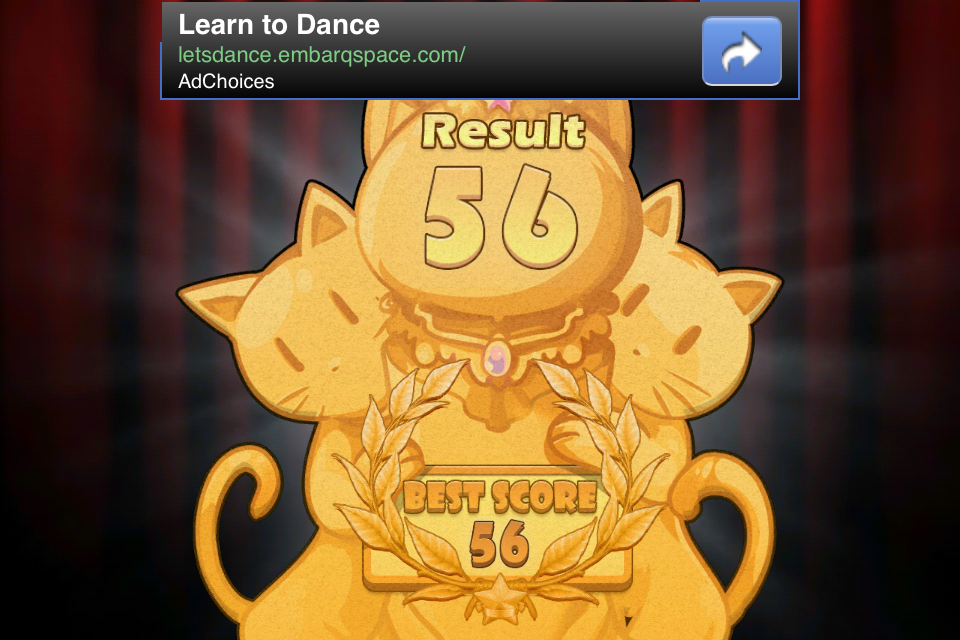
     When you finish, you'll get a final score.  If you do well enough you'll get a nice trophy.
     I suggest starting with the easy mode and working your way up.  The combinations can get very long and difficult to memorize.  It's less daunting to start with just the two button options.
     If you are particularly good at this game and want a greater challenge you can purchase the full version for only 99 cents.  This version will unlock the last mode (Crazy Mode) to really put your memory and rhythm skills to the test!
     The graphics are cute and the cats are adorable.  I like the catchy little music and memory games are always fun.  I really enjoyed this game, and I think you will too.  I only wish the music could be changed up sometimes.  Dancing to the same song over and over can be a little rough after a while.  Because of this I suggest playing this game in many small doses, rather than for an hour straight.
Rating: 4/5
  • Free
  • Category: Games
  • Updated: Jul 28, 2012
  • Version: 1.0.2
  • Size: 23.7 MB
  • Languages: English, BokmÃ¥l, Norwegian, Chinese, Danish, Dutch, Finnish, French, German, Greek, Hungarian, Indonesian, Italian, Japanese, Korean, Portuguese, Russian, Spanish, Swedish, Thai, Turkish, Vietnamese
  • Seller: Mad Head Limited

Wednesday, August 15, 2012

Simon's Cat in Purrfect Pitch

Simon's Cat in Purrfect Pitch App for iPhone
     Simon Tofeild is famous for his Simon's Cat animations.  These animations feature a typical cat.  Needy for attention (When he wants it), destructive, adventurous and usually hungry.  Watching his animations are a joy.  And now... you can play with Simon's cat in this musical game application, for free.
     There are two modes of play for this application.  Free play allows you to press the buttons on the keyboard as you like.  Play a song or just hit random notes.  Whenever a note is played, it doesn't give you the typical piano key sound... But rather Simon's cat meowing in that pitch.  So your entire song will be meowed out.
     The challenge mode is the actual game part.  Remember the Simon game?  It would play a note and a colour on a board.  Then you would hit it.  It would add another note and colour to the combination.  You would repeat it.  This continued, gradually adding more and more until you got it wrong.  They even had large console machines for this style of game in some public areas.  I recall there being one in a Little Caesar's Pizza place when I was little.  I was always good at memory games.  They had a rule that if you got a 20+ sequence score you'd get free bread sticks.  50+ got you a small pizza.  Let's just say I got a lot of free pizza and bread sticks.
     Simon will meow a note and it will show the key for that note on the piano below.  You repeat the pattern as long as you can.  When you make a mistake, you get a game over.  Try to get a the whole sequence!
     There are multiple songs to choose from in challenge mode.  It's not just a random musical sequence but an actual song is being played.  On the up side, this can teach you to play this song on the piano (Very simple tunes).  On the low side it's not much of a challenge once you know the song.
     You can also record your own songs and play them back.  Watch as Simon's cat bellows out your tune.
     For those of you that have never watched a Simon's Cat animation and are curious, you can view all of the currently available shorts at Simon's Cat's Youtube Channel.  I have provided the first short for you in this post.
     I really enjoyed this.  It's not something I found myself wanting to play with a lot.  But that could be just a personal preference.  It's simple and cute.  I like the idea, and the connection with Simon's Cat and the Simon Game that was so popular back in the day.  I think it's just a bit overly simple for me.  I didn't get too much out of it.  Maybe you'll have more fun with it.
Rating: 4/5
  • Free
  • Category: Games
  • Updated: Sep 23, 2010
  • Version: 1.2
  • Size: 2.3 MB
  • Languages: English, Dutch, French, German, Italian, Portuguese, Russian, Spanish, Swedish
  • Seller: Simon's Cat Ltd